Export Your Saved Columns In Facebook Ads Manager
Are you still adjusting all the columns in Facebook Ads Manager? There is a simple way to Export Your Saved Columns in Facebook Ads Manager.
Read more →
Book a free audit call and we will tell you which lever moves your numbers first.
Book a free auditThis tutorial will learn how to implement Facebook Conversion API for Shopify Store using Native App.
Before starting, we have to understand why you need to set up FB Conversion API in your store?
Due to all these problems, using Conversion API can improve the accuracy of the data, which will help you to make decisions for your business.
There is a lot of confusion regarding Conversion API setup and how it will work. Conversion API is not a replacement for your Standard Pixel Tracking.
When you install Pixel in your website, it helps collect various data from the user and how users are interacting with the website.
According to Facebook, they want to run Facebook Pixel parallel with Conversion API.
You might be thinking WHY ?
Facebook want to fix the gap (10%-15% difference) between the Shopify order and Facebook Conversion, which has come from Facebook Ads.
Second thought you might have that running Facebook Pixel parallel with Conversion API, what about the Duplicate Pixel and Server Side Event and captured by Facebook.
If you send both the events via browser and server, you don’t have to worry about event deduplication. Facebook will take care of things and will show you proper data in your Facebook Ads Manager.
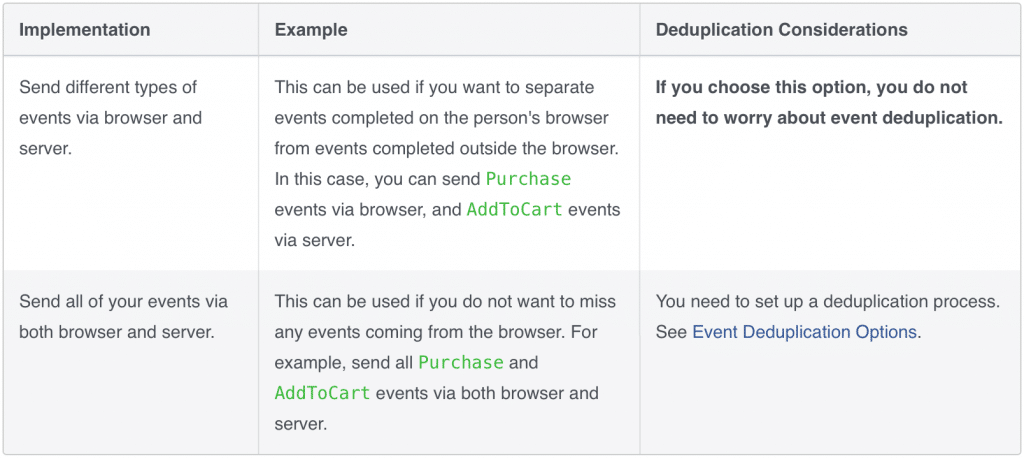
If you have installed Facebook channel in your Shopify store then you might know this is a new feature in the apps which was released in October 2020.
There are three new options to choose from in Facebook pixel settings:
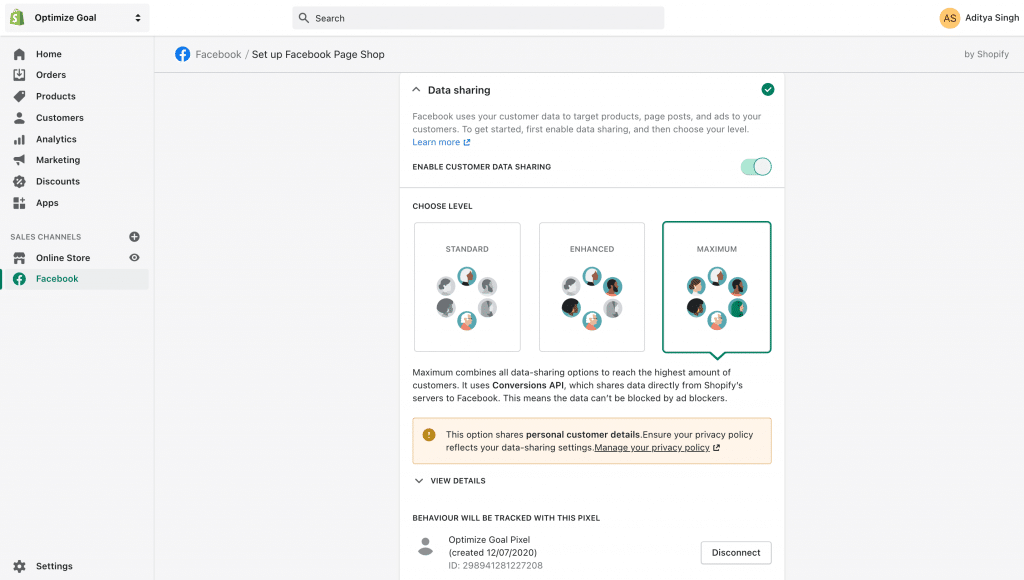
Facebook’s Conversions API is only available in Maximum option.
The Facebook channel let you choose how you want to collect the data from your website and share with Facebook. Facebook Channel has three option available Standard, Enhanced, or Maximum.
If you select the Standard option, then Pixel tracks customer browsing behaviour. Ads blocker can prevent the Pixel from sharing the data, and you will not get the accurate data.
If you select the Enhanced option, then the Pixel will share personal information using Advanced Matching. Facebook pixel extract your customer’s name, location, email address, and phone number, as well as their browsing behaviour. Ads blocker can prevent the Pixel from sharing the data. If you select the Standard option, then Pixel tracks customer browsing behaviour. Ads blocker can prevent the Pixel from sharing the data, and you will not get the accurate data.
If you select the Maximum option, then it will be using Conversion API and Facebook Pixel. It will take both the data from the browser and Shopify server. The data will be sent directly to the Facebook server. Conversion API will help in the conversion tracking if someone uses Adblocker.
Let us know your thought about Facebook Conversion API. If you are facing any issue, leave a comment.
We set up tracking, run the ads and fix the funnel for D2C brands — so guides like this one become someone else's job.
Are you still adjusting all the columns in Facebook Ads Manager? There is a simple way to Export Your Saved Columns in Facebook Ads Manager.
Read more →
Are you confused about Facebook broad targeting? Then you should test facebook broad targeting for your brand, we have seen positive results for a few brands.
Read more →
Are you running Google Ads or Facebook Ads for your eCommerce Store? If yes, then you might be only focusing on the conversion, rather than Profit you are
Read more →