
Implement Youtube Video Tracking Via Google Tag Manager
In this, we will be covering how to implement youtube video tracking via Google tag manager using the build-in Variable.
Read more →
Book a free audit call and I will tell you which fix moves your numbers first.
Book a free auditIf you are a mac user and you tried to enable GTM preview mode in safari but didn’t work that is because Apple has Introduce Intelligent Tracking Prevention
In Safari, third-party cookies are blocked by default, that’s why Google Tag Manager Preview Mode does not work.
Steps To Enable GTM Preview mode in the Safari
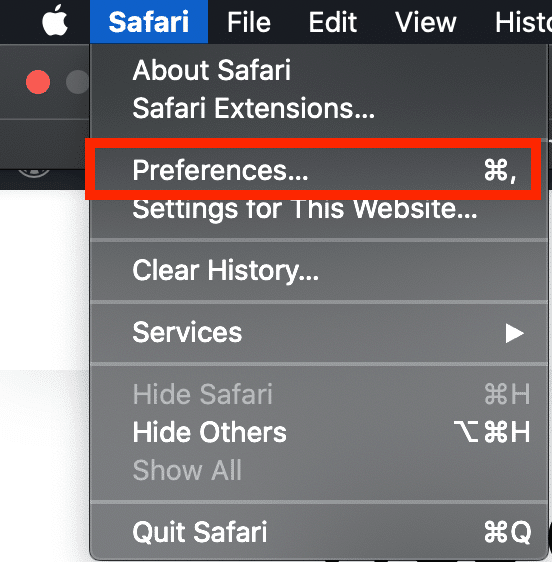
To change the setting of safari, you have to open Setting.
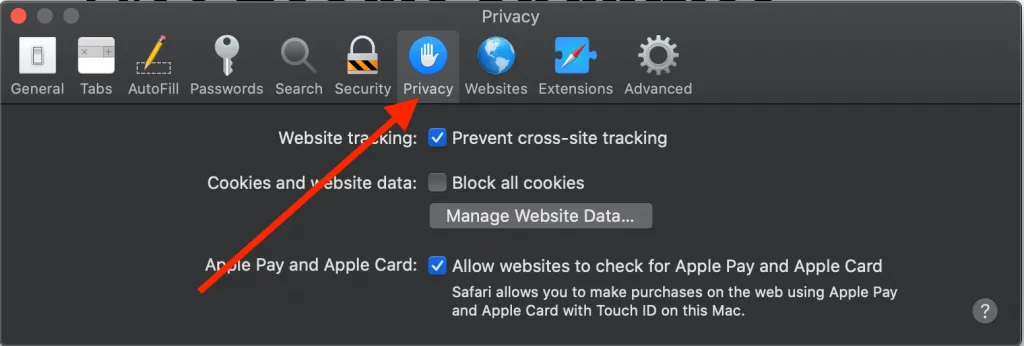
In setting, Click on the privacy tab.
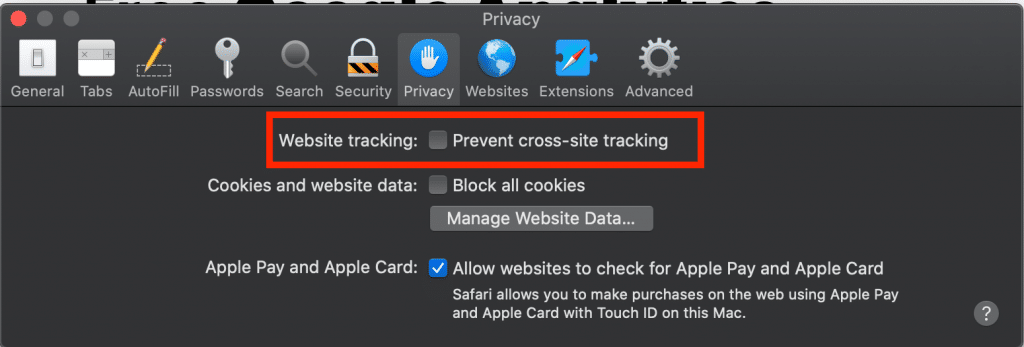
You have uncheck the website tracking and close the setting.
Now you can open the Google Tag Manager and Verify it, Google Tag Manager will be working on your Safari.
I fix the tracking, run the ads and plug the funnel leaks for $700 a month — so guides like this one become my job, not yours.
In this, we will be covering how to implement youtube video tracking via Google tag manager using the build-in Variable.
Read more →
Google has released a new feature "Bulk Actions" in Google Tag Manager. This feature has made a lot of things easier in Google Tag Manager for developers and
Read more →
Before you start implementing cross-domain Google Ads conversion there are few things you need:
Read more →