
How To View Full Page URLs In GA4
Discover how to view full page URLs in GA4 and gain deeper insights into your website's performance. Uncover actionable strategies to boost user experience and conversions.
Read more →
Book a free audit call and we will tell you which lever moves your numbers first.
Book a free auditGoogle Analytics is the most powerful tool if you use it in the right way. But most of the businesses don’t understand how to see all the metrics as sometimes data are hard to read due to some common mistakes in reporting.
Hubspot is one of the Best CRM tools available for inbound strategy. Many companies use it to understand user behaviours and they can use data to make strategies for the future.
If you have connected Google Ads to Hubspot you might have seen Tracking Parameters in Google Analytics and it is confusing as one URL can have multiple tracking, so you will be seeing the same content URL multiple times in Google Analytics.
You might be thinking why these Parameters are added by HubSpot?
Hubspot wants to track information for their own system which is really helpful in allowing the tool to learn about the audience, but these URL queries can mess your Google Analytics Reports As you can see below.
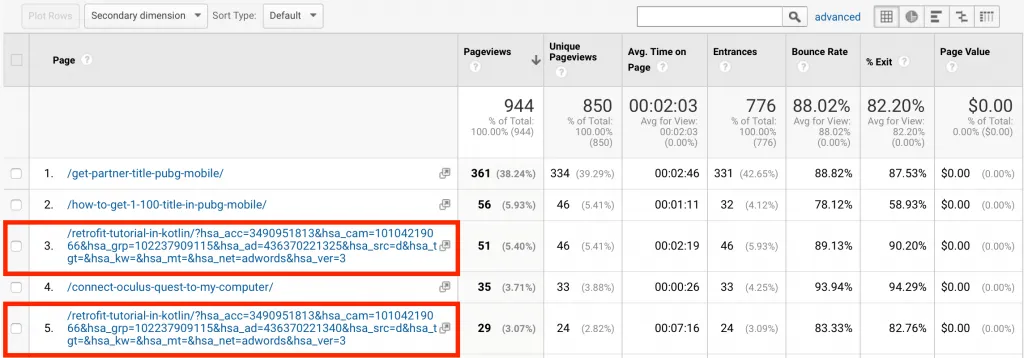
When you go to Behaviour > Site Content > All Pages you will see some duplicate Site URL with Different Query Parameters.
So you must be thinking how to correct this error !!
Don’t worry as there is an easy way to exclude Hubspot query parameters in google analytics.
After you connect any ads account with HubSpot, HubSpot will apply the tracking parameter at the end of the URL. These URL parameters you will be seeing in Google Analytics.
We have compiled all the HubSpot Tracking Parameters below:
HubSpot Email Tracking Parameters
HubSpot CTA Tracking Parameters
HubSpot Ad Tracking (Facebook, Google , Linkedin)
Step 1: Go To the Google Analytics > Admin > View Setting
Step 2: Copy all the HubSpot URL Parameter and Paste it in Exclude URL Query Parameter in GA.
Step 3: Press the Save Button.
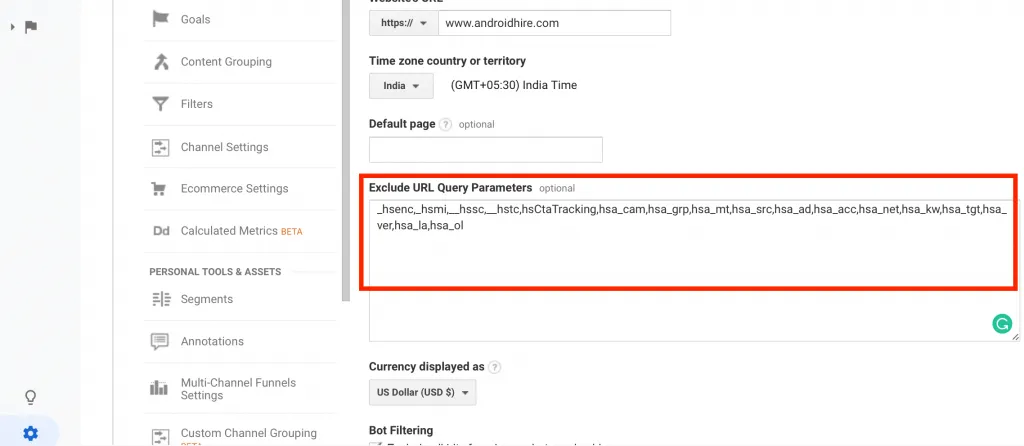
_hsenc, _hsmi, __hssc, __hstc, hsCtaTracking, hsa_cam, hsa_grp, hsa_mt, hsa_src, hsa_ad, hsa_acc, hsa_net, hsa_kw, hsa_tgt, hsa_ver, hsa_la, hsa_ol
Tada! Google Analytics will no longer have these HubSpot Query parameters.
Even if you are not connected to Hubspot, I will recommend you to add these values in Google Analytics. Maybe in the future, you connect Hubspot for your business, these parameters will not mess your data in Google Analytics.
We set up tracking, run the ads and fix the funnel for D2C brands — so guides like this one become someone else's job.
Discover how to view full page URLs in GA4 and gain deeper insights into your website's performance. Uncover actionable strategies to boost user experience and conversions.
Read more →
To overcome this problem we have to exclude the IP address so that Google Analytics 4 don't track the audience from these IP address. Read More: How to
Read more →
Google Analytics automatically reflects where the traffic is coming from and displays the domain names of these sites as the referral-traffic in your report.
Read more →