How To View Full Page URLs In GA4
Discover how to view full page URLs in GA4 and gain deeper insights into your website's performance. Uncover actionable strategies to boost user experience and conversions.
Read more →
Book a free audit call and I will tell you which fix moves your numbers first.
Book a free audit
Google Analytics automatically reflects where the traffic is coming from and displays the domain names of these sites as the referral-traffic in your report. This makes it easy for you to understand from where you are getting the major traffic.
Read More: Cross-domain Tracking in Google Analytics 4
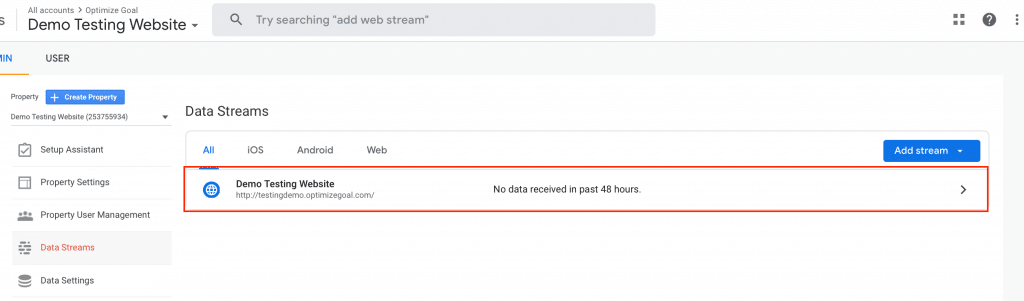
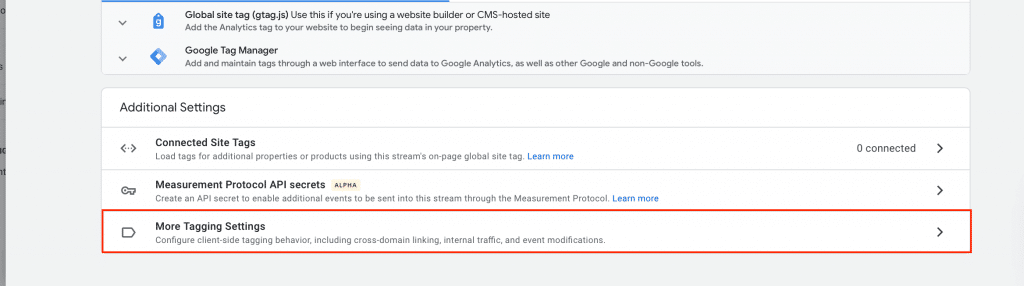
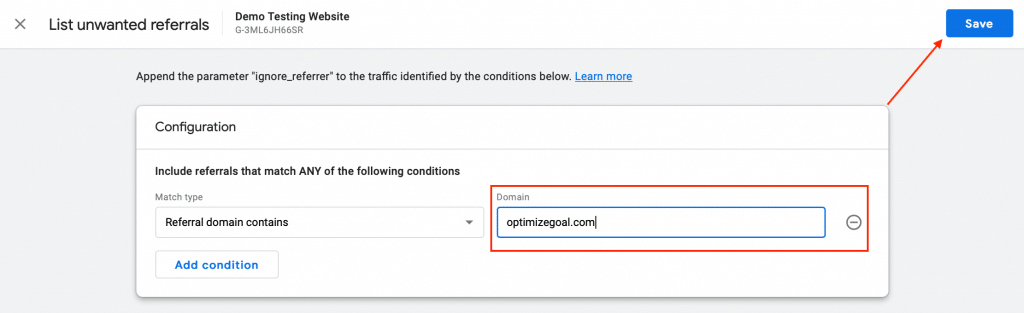
Tada! You are done. Now you won’t be seeing the domain name entered in your report.
I fix the tracking, run the ads and plug the funnel leaks for $700 a month — so guides like this one become my job, not yours.
Discover how to view full page URLs in GA4 and gain deeper insights into your website's performance. Uncover actionable strategies to boost user experience and conversions.
Read more →
To overcome this problem we have to exclude the IP address so that Google Analytics 4 don't track the audience from these IP address. Read More: How to
Read more →
Postbacks allow Google Analytics to ping ad network when it detects an app install ("first launch") or in-app purchase ("Transaction") using a third party
Read more →